Skip to content
macOS & Linux · Free to use

Run coding agents
in parallel.

Run a pack of agents (on Claude or Codex), each in its own isolated git worktree, so they don’t step on each other. Then review it all in the editor: diffs, git, databases, Docker. Sessions are saved, so you can quit and pick any of them up later.

signed .dmg · macOS & Linux · free

Shipping in beta · rough edges expected · bug reports welcome

Shikigami showing parallel agents, a collapsible agent sidebar, Editor, databases, Git History, and Docker tools
Bring your agents
local

Claude

claude on your PATH

supported agent runtime
local

Codex

codex on your PATH

supported agent runtime

Requires Claude Code and/or Codex CLI installed locally.

Igor, the developer behind Shikigami
Igor Single person · @koneko_lab
Meet the maker

One developer, everything in public.

“It got annoying, jumping between a stack of terminal sessions and a separate IDE. I wanted both worlds in one place, in a way that’s easy and reliable.”

Shikigami is built and released by me, on my own. It’s free, under active development, and currently in beta. Your feedback matters to me, and it shapes where the app goes next.

The hard part

Three terminal tabs
step on each other.

Spin up a few agents in a few tabs and they fight over the same working tree, clobber each other’s edits, and lose every bit of state the moment you quit. That’s the problem to solve, not another chat box.

Its own worktree, every time

Each agent gets a dedicated git worktree. No collisions, no clobbered edits.

Saved & resumable

Quit and reopen. Sessions reattach exactly where you left them.

One surface to watch them all

Projects as tabs, agents as panes, all of them at a glance.

Shikigami fox-mask mark
The name

Why it’s called
Shikigami.

A shikigami is a spirit from Japanese folklore, summoned to carry out tasks on someone’s behalf. That’s roughly the model here: you hand work to a set of agents and they go off and run it. The name fit, so it stuck.

What it does

It’s a real desktop app.

Agentic Coding mode runs the agents. A full editor lets you review their work. It’s a native desktop IDE, not a browser wrapper.

The agents

Parallel agents, no collisions

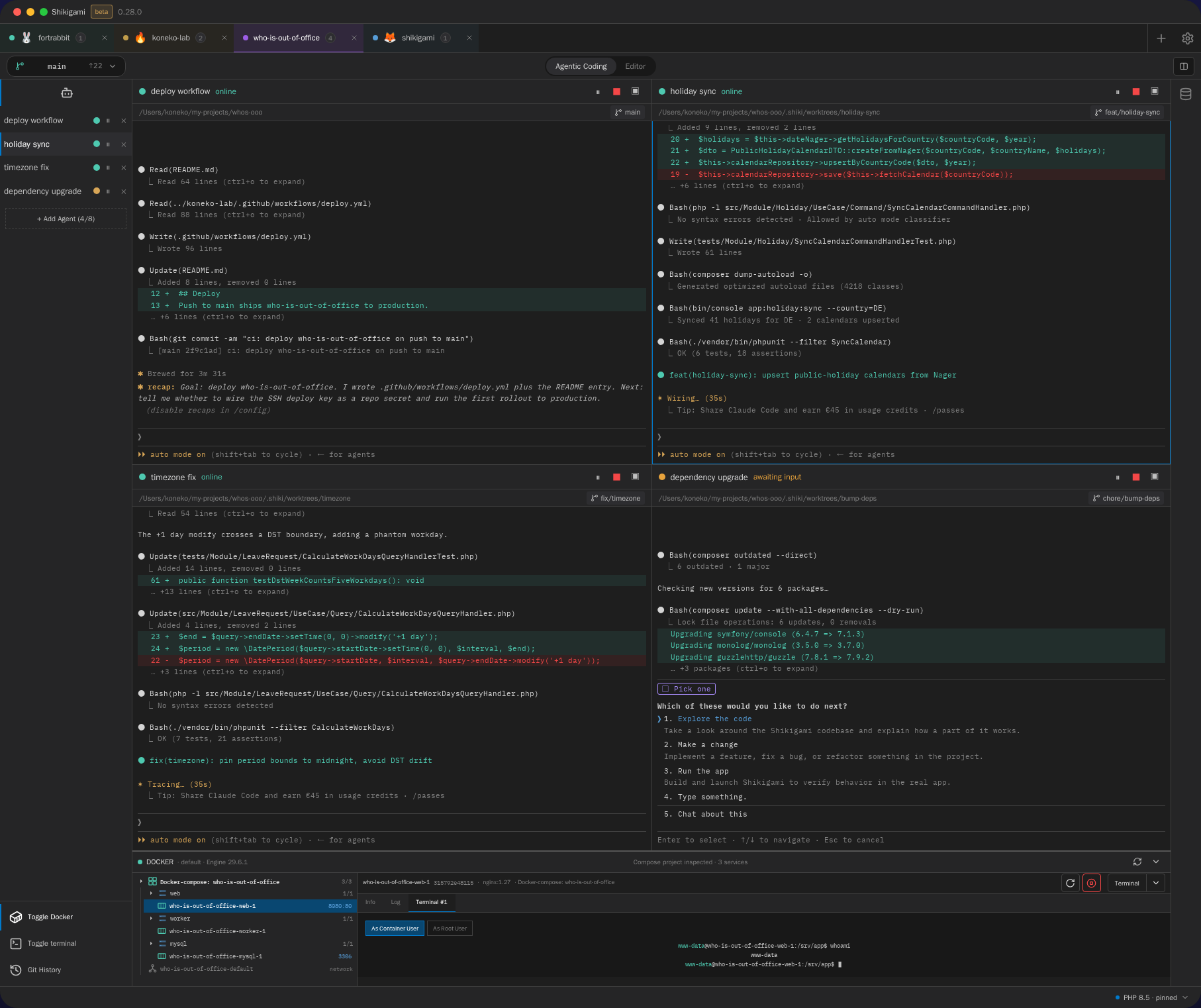
Run as many agents as you need. Each one works in its own git worktree, so they can all touch the same repo at once without overwriting each other.

Four agent sessions running in parallel

Bring your own agent

Run each agent on Claude Code (Opus, Sonnet, Haiku) or OpenAI Codex (GPT-5.6). Pick the model and reasoning effort per agent.

Terminal per agent

A real PTY behind every agent: a full shell, not a sandbox.

Resume anywhere

Quit and reopen. Every session reattaches where you left off.

Click a notification, land in the session

When an agent finishes its turn or needs your input, it sends a desktop notification. Click it and you go straight to that agent’s session.

A full IDE to review their work

A full editor built in

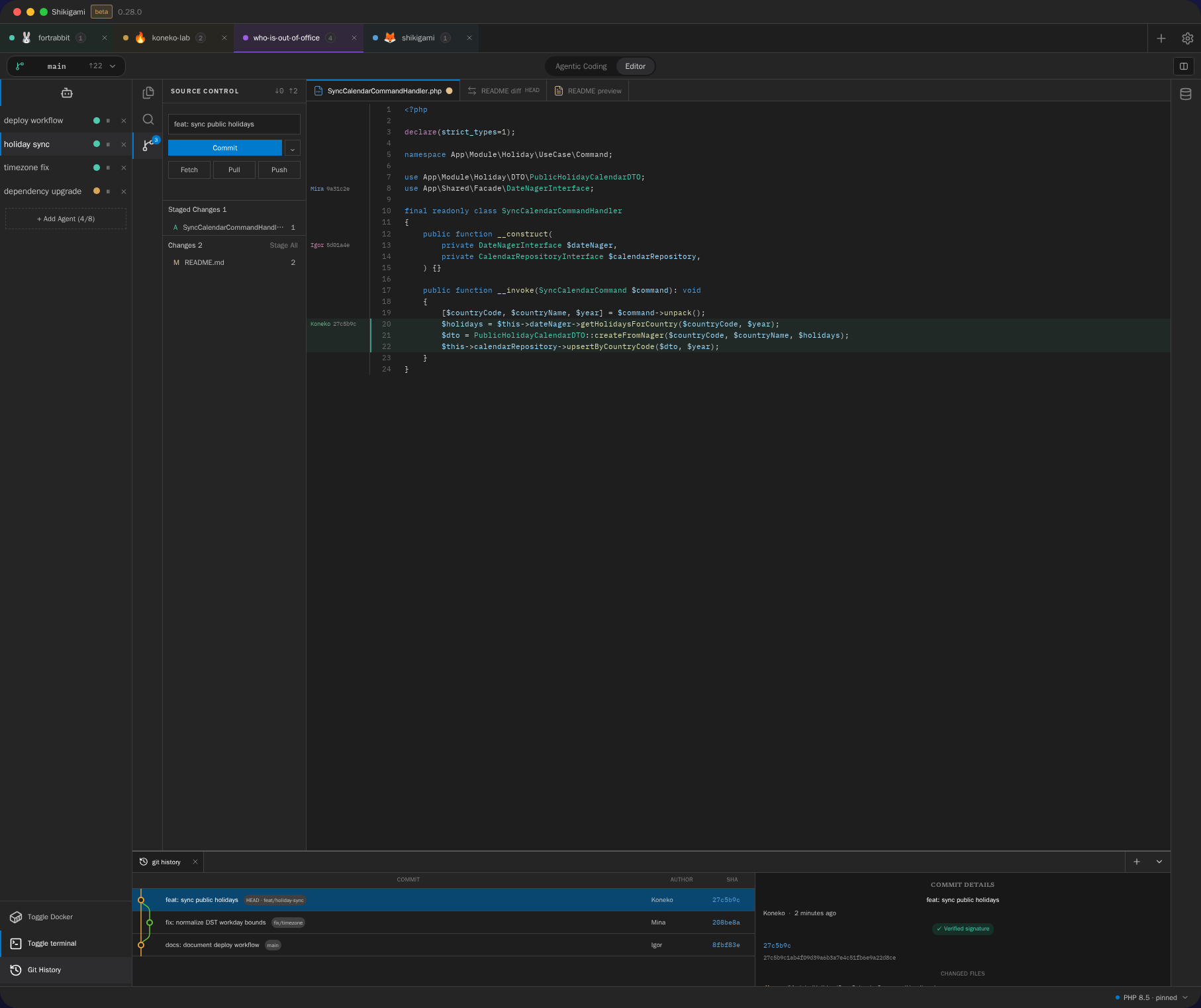
Switch to Editor mode for a Monaco code editor with your whole tree, split view, and a diff viewer. Review a diff, walk the git history and per-line blame across every repo in a monorepo, then commit (GPG-signed) without leaving the app.

Shikigami Editor with Source Control, PHP code, and Git History commit details

Code intelligence, included

Go-to-definition, find-references, completion, and live diagnostics for PHP (8.1–8.5) and TypeScript/JavaScript — no language server to install.

Databases, in the app

Browse MySQL tables, run and save SQL queries, and inspect Redis keys — read-only, right beside the diff.

Docker in the dock

See your Compose stack, tail per-service logs, open a container shell, and start or stop services — all from inside the app.

Build in public

There’s a fifth agent.
It streams.

Four agents run in the grid. The fifth is the stream where this whole app gets built, live and unedited, commit by commit, by the one developer writing it. Same repo, same branch, nothing cut.

every commit, on stream
every bug, kept in
resumable · full archive on the channel
session · live-build ● streaming
~/shikigami main
How it works

Start. Let it run. Review.

01

Start

Name a task and pick an agent — Claude or Codex. It spins up in a fresh, isolated git worktree of its own.

02

Let it run

It works alongside your other agents while you watch, or while you do something else.

03

Review

Read the diff in the editor, resume any session, merge what’s good, and dismiss the rest.

Good for

When one agent isn’t enough.

One agent per feature

One agent per branch, all building at once.

Hands-on coding too

Write the parts you care about in the editor while an agent handles the rest alongside you.

Long migrations

Kick one off, quit, resume it tomorrow.

Parallel bug triage

An agent per failing test, all running at once.

FAQ

Straight answers.

01

Is Shikigami free?

Yes. It’s free to use, no account required, no sign-up, and no cloud.
02

What platforms does it run on?

macOS (a signed .dmg for Apple Silicon and Intel) and Linux, as an AppImage.
03

Is it a cloud or web product?

No. It’s a desktop app that runs on your own machine. Agents and their git worktrees are all local.
04

Which AI agents does it run?

Claude Code (Opus, Sonnet, Haiku) and OpenAI Codex (GPT-5.6), via their local CLIs. Model and effort are chosen per agent.
05

How do agents avoid conflicts?

Each agent gets its own isolated git worktree, so they can all touch the same repository at once without overwriting each other.
Shikigami

Run your first agent.

Free. Solo mode. A signed desktop app. No account, no cloud.