Skip to content
Multi-agent harness

Not a subagent harness. A pack that works together.

I built Shikigami to run Claude Code, Codex and opencode side by side, each on the model and effort I pick. With delegation turned on, they hand work to each other and report back.
You decide the flow, and by default nothing gets submitted until you press Enter.

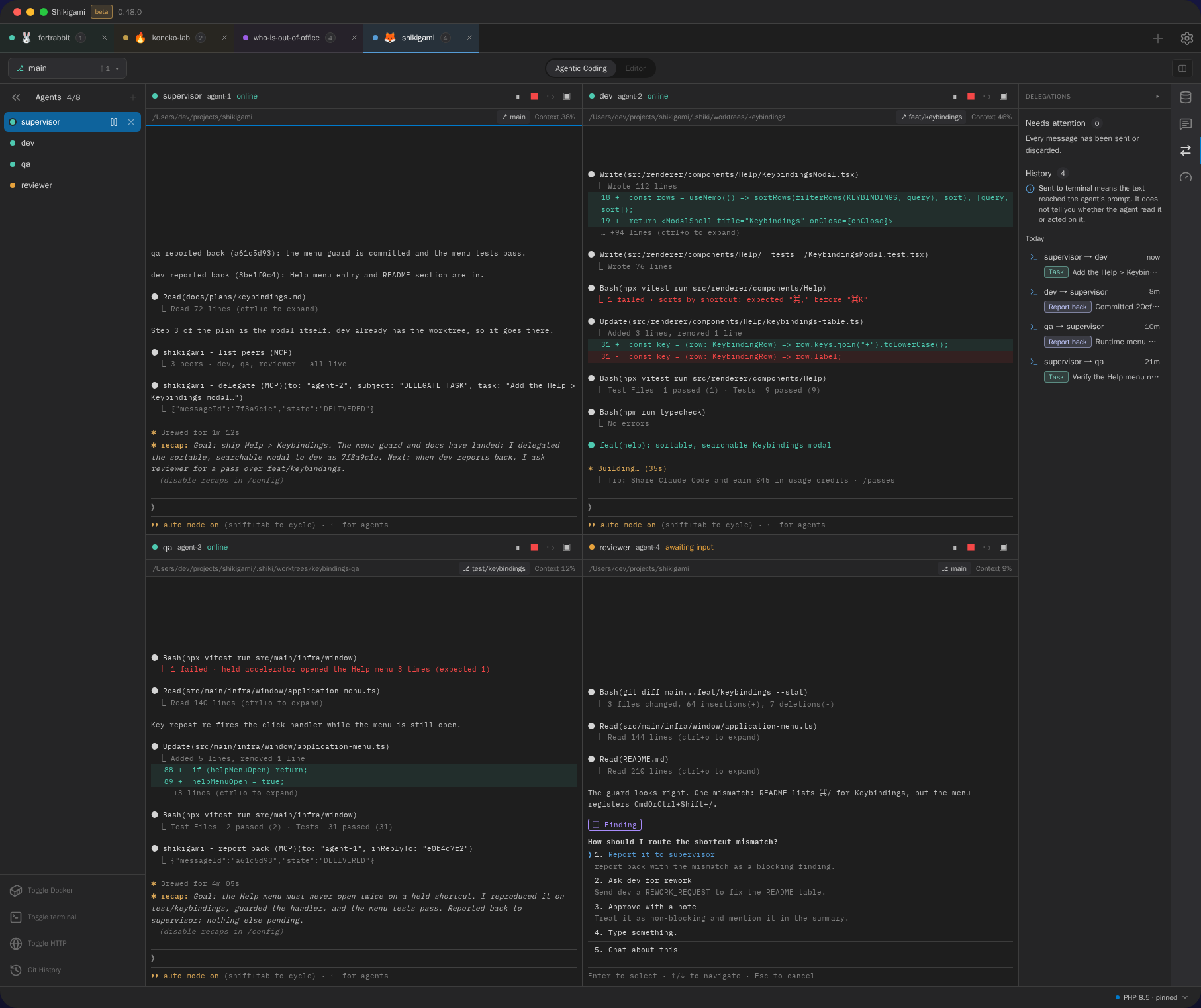
Shikigami with a supervisor agent delegating a task to a Codex dev agent while qa and reviewer agents report back, and the Delegations panel open
What’s a harness

A harness is everything around the model.

The loop, the tools, the terminal, the permissions and the context. The model is the engine, and the harness is what lets it drive. Most agent harnesses wrap one model and let it spawn copies of itself as subagents that report back to it.

Shikigami doesn’t replace any of that. Claude Code and Codex keep their own harnesses, subagents included. What I built sits one level up. It lets those agents, from different vendors, see each other and pass work around, and every one of them stays in its terminal that you can read and type into.

Subagents vs peers

Copies of one model, or a team of different ones.

I checked each of these against its own docs. They’re good tools, and some of them solve a different problem. The difference I care about is the shape: who can hand work to whom, and who approves communication exchange.

Checked against each product’s own docs, October 2026. Each column heading links its main source; a cell links its own source when it comes from a different page.
Aspect Claude Code agent teams DeepSeek Harness Conductor Codex subagents Shikigami
Shape A fixed lead plus teammates that can message each other A parent agent delegates to child subagents Independent agents in parallel workspaces source for Conductor: Shape A parent spawns subagents and collects their results Peers: any live agent can delegate to any other
Vendors in one setup Claude Code only DeepSeek and other providers; Claude Code and Codex as optional child backends Claude Code, Codex, Cursor, OpenCode, one per chat tab source for Conductor: Vendors in one setup Codex only Claude Code, Codex and opencode side by side
Agent-to-agent delegation Yes, between Claude Code sessions Yes, parent to child; children return a final answer No; a one-way plan hand-off source for Conductor: Agent-to-agent delegation Yes, parent to child, Codex only Yes, in any direction and across vendors, with report back (opencode receives only)
Who starts delegated work Starts automatically; the lead approves teammate plans An automatic tool call; children run unattended — Automatic; subagents inherit the approval mode You. Messages wait in the prompt for Enter unless you turn on auto-submit
Isolation Teammates share the lead’s working directory Children share the parent’s workspace A git worktree and branch per workspace source for Conductor: Isolation Inherits the parent’s sandbox; the app can use worktrees source for Codex subagents: Isolation A git worktree or the project root, per agent
Where it runs The Claude Code CLI Desktop (macOS, Windows), web UI, CLI source for DeepSeek Harness: Where it runs macOS app; paid cloud workspaces source for Conductor: Where it runs Codex app, CLI, IDE extension, cloud source for Codex subagents: Where it runs Desktop app on macOS, Linux and Windows; local only
Status & price Experimental, off by default; paid Claude plan or API Developer preview; MIT; bring your own keys Generally available; free tier and paid plans source for Conductor: Status & price On by default; needs a ChatGPT plan source for Codex subagents: Status & price Free, closed source
Your flow

Three pieces. Arrange them however you work.

Presets

Save an engine, model, effort and extra flags as a named preset. Quick start then turns “Codex, high effort, in a worktree” into one click.

Prompts

A library of your own instructions, in groups. Drag one onto an agent and it lands in the prompt unsent, so you can adjust it first.

Delegation

Agents find their live peers and hand work over as a Task, a Rework or a Blocked request. When they’re done, they report back to whoever asked.

Here’s a flow you can start from:

  1. supervisor claude · opus plans, delegates
  2. dev codex · gpt-5.6 Task → builds → Report back
  3. qa claude · sonnet verifies, sends Rework
  4. reviewer claude · opus a second opinion

It’s a recipe, not a pipeline engine. Swap any step’s model, or drop the steps you don’t need.

Mix models on purpose

The right model per step, and a second opinion from another vendor.

No single model is the best at every step. I let Codex write the code and have Claude check it, because a reviewer from another vendor doesn’t share the author’s habits. Each agent gets its own engine, model and effort, so the expensive model only runs where it earns its cost.

EngineModels EffortDelegation
Claude CodeOpus, Fable, Sonnet, Haikumedium, high, xhighsends and receives
CodexGPT-6 Astra, GPT-5.6 Sol / Terra / Luna, GPT-5.5, GPT-5.4 minimediumsends and receives
opencodeits own catalog, including local Ollama models—receives only
You stay in the loop

A peer’s message is not your permission.

Every delegated message gets its own entry in the Delegations panel. It reaches the receiving agent wrapped in a header that says who sent it, what it’s about, and exactly where it ends. The header tells the agent the message isn’t consent and can’t answer a permission prompt. By default it waits in the prompt until you press Enter.

Delegation is off until you turn it on, and it runs through a local server on 127.0.0.1. The panel marks each entry “Sent to terminal”, “Not delivered” or “Failed”. It never calls a message done just because it was typed in.

Usage

One view across the pack.

Four agents burn through a plan faster than one, so I wanted the limits in one place. The Usage panel shows Claude and Codex plan limits (the 5-hour and weekly windows) with their reset times, plus a context meter for every running agent in every workspace. It reads the files the CLIs already write on disk. Tokens only, no network calls.

How it works

Total freedom, you write the flow.

Shikigami doesn’t run pipelines for you, and it has no built-in roles. You write the flow and decide who does what. That’s deliberate: I’d rather see every hand-off than trust a runner I can’t watch.

A few boundaries to keep in mind. Agents only reach peers in the same workspace. There’s no “completed” state, because a delivered message was typed in, which isn’t the same as done. opencode can receive delegated work but can’t send it. Usage tracking covers Claude and Codex only.

FAQ

Questions about the harness

01

What is an agent harness?

Everything around a model that lets it act: the loop, the tools, the terminal, the permissions and the context. Claude Code and Codex each ship their own. Shikigami sits one level up and lets several of those agents, from different vendors, see each other and pass work around.
02

How is Shikigami different from Claude Code agent teams?

Agent teams is an experimental Claude Code feature: one lead session starts Claude Code teammates that share a task list and can message each other. The lead stays fixed, every teammate is a Claude Code instance, and teammates share the lead’s working directory. Shikigami runs separate CLIs from more than one vendor side by side as peers, each optionally in its own git worktree. With delegation on, any live agent can hand work to another and get a report back, and the message waits for you to press Enter unless you turn on auto-submit.
03

How is Shikigami different from DeepSeek Harness?

In DeepSeek Harness, a parent agent delegates to child subagents, which can include Claude Code or Codex through optional plugins; the children run unattended in the parent’s workspace and return their final answer. Shikigami doesn’t ship its own agent. It hosts each vendor’s CLI as a visible terminal you can type into, and every agent is a peer. Shikigami is free but closed source.
04

How is Shikigami different from Conductor?

Both run Claude Code and Codex in parallel, each in its own git worktree, and both show plan usage. Conductor is a macOS app with optional paid cloud workspaces, and it also supports Cursor and OpenCode; its agents work independently, with a one-way plan hand-off as the only documented link between them. Shikigami runs on macOS, Linux and Windows, stays local, and adds opt-in agent-to-agent delegation with reports back across vendors.
05

Can Claude Code and Codex work together?

Yes. Turn on agent delegation in Settings and restart the agents. Each one gets four tools (register, list_peers, delegate and report_back) through a local MCP server on 127.0.0.1. A Claude Code agent can hand a task to a Codex agent and get a report back, and the other way round. opencode can receive delegated work but not send it.
06

Do delegated messages run automatically?

Not by default. A delegated message is pasted into the receiving agent’s prompt, framed with who sent it and safety rules, and it waits there until you press Enter. Auto-submit is an opt-in setting. The Delegations panel says “Sent to terminal” for a delivered message, which means it was typed in, not that the work is done.
07

Does usage tracking send my data anywhere?

No. The Usage panel reads the files Claude Code and Codex already write on your machine and shows plan limits and per-agent context as token counts. There are no network calls and no dollar figures. opencode doesn’t report usage.

Put the pack to work.

Docs for delegation, prompts and presets are next on my list.